
Imagine visiting a website on your phone. You tap a link and wait. The page takes several seconds to appear. You try to click a button, but nothing happens. Just as you are about to tap again, the page shifts and the button moves.
Most visitors will leave and look for another website.
This is why website speed matters. A website should load quickly, respond to user actions and remain stable while visitors browse. Google measures some of these experiences through a set of metrics called Core Web Vitals.
For businesses in Kenya, website performance is especially important because many customers access websites through mobile phones. A website that performs well on a fast office connection may feel very different on a mobile device with a slower connection.
In this guide, we explain Core Web Vitals, how to use Google PageSpeed Insights and how to improve website performance. We also look at common problems affecting WordPress websites and the practical steps businesses can take.
What are Core Web Vitals?
Core Web Vitals are Google's measurements of important aspects of a visitor's experience on a website.
They focus on three things.
- How quickly the main content appears.
- How quickly the website responds when someone interacts with it.
- Whether the page layout remains stable while loading.
Google uses three main metrics to measure these experiences.
- Largest Contentful Paint (LCP)
- Interaction to Next Paint (INP)
- Cumulative Layout Shift (CLS)
Each metric measures a different part of the browsing experience.
1. Largest Contentful Paint (LCP)
Largest Contentful Paint measures how long it takes for the largest visible content element to appear on the screen.
This is usually the main banner image, a large product image or a prominent block of text.
Imagine opening a restaurant website. The page background may appear quickly, but the large banner showing the restaurant and its food takes five seconds to load.
The visitor sees an incomplete page while waiting for the main content.
Google recommends an LCP time of 2.5 seconds or less.
| LCP score | Assessment |
|---|---|
| 2.5 seconds or less | Good |
| More than 2.5 to 4 seconds | Needs improvement |
| More than 4 seconds | Poor |
How to improve LCP
Large images are a common reason for slow loading.
A website may have a beautiful homepage banner, but if the image is several megabytes, visitors have to download a lot of data before seeing it.
Some practical improvements include:
- Compress images before uploading them
- Convert suitable images to WebP or AVIF
- Resize images to match the dimensions where they appear
- Use responsive images for different screen sizes
- Enable browser and server caching
- Improve server response time
- Avoid lazy loading the main image visible immediately when the page opens
You should also check whether the main image is being discovered early by the browser. In some cases, preloading the LCP image can help.
2. Interaction to Next Paint (INP)
Interaction to Next Paint measures how quickly a website responds to user interactions.
These include tapping a button, opening a menu, selecting a product option or interacting with a form.
Imagine a customer visiting an online store. They tap the Add to Cart button, but the page takes a long time to respond.
The customer may tap several times or assume the website is broken.
Google recommends an INP of 200 milliseconds or less.
| INP score | Assessment |
|---|---|
| 200 milliseconds or less | Good |
| More than 200 to 500 milliseconds | Needs improvement |
| More than 500 milliseconds | Poor |
How to improve INP
JavaScript can affect how quickly a website responds.
A page may load quickly but still feel slow when visitors interact with it. This can happen when too much JavaScript runs in the browser or when scripts block the main thread.
Ways to improve INP include:
- Remove unnecessary JavaScript
- Reduce the number of scripts loaded on each page
- Delay non-essential third-party scripts
- Break up long JavaScript tasks
- Improve event handlers used by buttons and forms
- Avoid unnecessary animations and complex interactions
- Reduce excessive DOM elements
For WordPress websites, review plugins that add scripts to every page. A plugin may only be needed on the contact page, but its JavaScript could be loading across the entire website.
3. Cumulative Layout Shift (CLS)
Cumulative Layout Shift measures unexpected movement of content while a page loads.
You have probably experienced this problem.
You are reading an article when an image suddenly appears above the paragraph. The content moves down, and you lose your place.
Or you are about to click a button when a banner loads and pushes it somewhere else.
These movements create a frustrating experience.
Google recommends a CLS score of 0.1 or less.
| CLS score | Assessment |
|---|---|
| 0.1 or less | Good |
| More than 0.1 to 0.25 | Needs improvement |
| More than 0.25 | Poor |
How to improve CLS
Most layout shifts happen because the browser does not know how much space an element will occupy before it loads.
You can reduce them by:
- Specifying image width and height
- Reserving space for advertisements and embedded content
- Setting fixed dimensions for banners and media containers
- Avoiding content that gets inserted above existing content
- Using appropriate font loading settings
- Checking whether popups and promotional banners move existing content
A good website should have a predictable layout. Visitors should not have to chase buttons and text as the page loads.
Core Web Vitals scores at a glance
Here is a summary of the three metrics and Google's recommended targets.
| Metric | What it measures | Good score |
|---|---|---|
| LCP | How quickly the main content loads | 2.5 seconds or less |
| INP | How quickly the website responds | 200 milliseconds or less |
| CLS | How stable the page layout is | 0.1 or less |
Google assesses these metrics using real visitor data at the 75th percentile. This means that at least 75% of visits should meet the good threshold for each metric.
A page needs to meet all three good thresholds to pass Core Web Vitals.
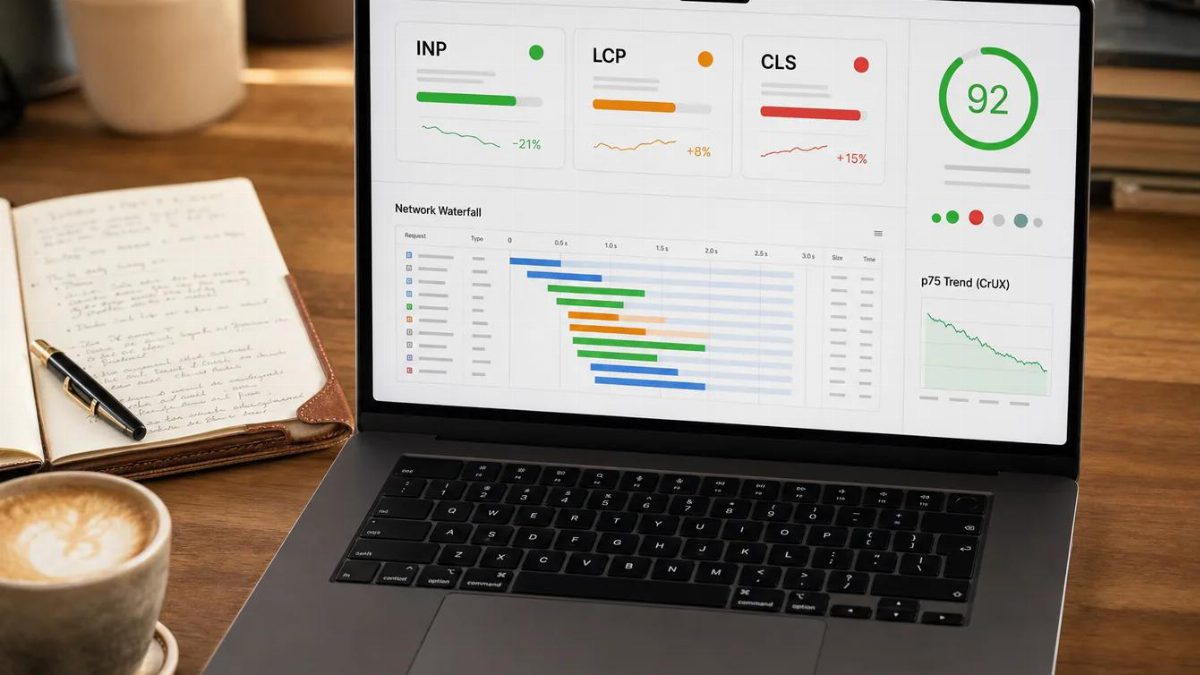
What is Google PageSpeed Insights?
Google PageSpeed Insights is a free tool that analyses the performance of a webpage.
It provides a performance score and recommendations for improving loading speed, responsiveness and other aspects of the page.
You can test your website at pagespeed.web.dev. Simply enter your website address and click Analyse.
PageSpeed Insights provides two types of information.
Lab data
Lab data comes from a controlled test using Lighthouse.
It helps identify problems such as:
- Large images
- Unused JavaScript
- Render-blocking CSS
- Slow server responses
- Excessive page elements
- Poorly configured caching
Lab data is useful when developing a website or testing changes.
Field data
Field data comes from real visitors using Chrome browsers.
It helps you understand how people actually experience your website across different devices, locations and network conditions.
This data is particularly useful because a simulated test cannot represent every visitor's device or internet connection.
A website can score 95 in a Lighthouse test and still have poor Core Web Vitals in real-world usage.
The two measurements answer different questions. Lab data helps you investigate problems, while field data shows how visitors experience the website.
Why does my website have a low PageSpeed score?
There is rarely one reason why a website is slow.
Performance problems often come from several small issues that add up.
Here are some common causes.
1. Unoptimized images
A business may upload photographs directly from a camera or phone without resizing them.
A 5MB image may be displayed in a space that only needs a much smaller file.
This increases the amount of data visitors must download.
Resize images to the dimensions required by the design. Compress them and use modern formats such as WebP where appropriate.
2. Too many WordPress plugins
WordPress makes it easy to add features through plugins.
You can install plugins for forms, sliders, popups, security, SEO, social sharing and many other functions.
However, some plugins add CSS and JavaScript to every page. Others perform unnecessary database queries or load external services.
The number of plugins alone does not determine website speed. The quality of the plugins and the resources they use matter more.
Review your installed plugins regularly. Remove those you no longer need and avoid installing several plugins that perform the same task.
3. Heavy themes and page builders
Some WordPress themes come with many features, animations and design elements.
Page builders can also generate large amounts of HTML, CSS and JavaScript.
This does not mean that every website built with Elementor or another page builder will be slow.
The result depends on how the website is designed and configured.
Avoid unnecessary animations, large sliders and complicated page layouts. Use only the features that support the website's purpose.
4. Slow web hosting
Your hosting company plays an important role in website performance.
When someone visits your website, the server must respond before the browser can begin displaying the page.
A slow server increases waiting time.
Shared hosting can be suitable for small business websites, but performance may suffer when the server is overloaded or the package has limited resources.
If your website consistently has a slow server response, consider upgrading your hosting or moving to a better configured server. Our guide to web hosting and domain costs in Kenya explains what to compare before buying.
5. Too much JavaScript and CSS
Websites use JavaScript and CSS to create their appearance and functionality.
However, loading unnecessary scripts can delay rendering and make interactions slower.
Some common causes include:
- Multiple animation libraries
- Unnecessary sliders
- Chat widgets
- External tracking scripts
- Multiple font files and weights
- Scripts from plugins that are not needed on the current page
Remove unused resources and load scripts only where they are required.
6. External scripts and third-party services
Some websites load content from other services.
Examples include Google Maps, analytics tools, social media feeds, chat widgets, advertising scripts and external fonts.
Each external service can introduce another network request.
You do not need to remove every third-party service. Instead, decide which ones are important and avoid loading unnecessary services before the visitor needs them.
How to improve WordPress website speed
WordPress powers many business websites in Kenya. It is flexible and relatively easy to manage, but it needs proper configuration. If you are still deciding on a platform for an online store, our comparison of WordPress website design options for ecommerce covers the alternatives.
Here is a practical approach.
Start with hosting
Choose hosting that provides sufficient server resources, modern PHP support, reliable storage and good server response times. For typical prices, see our guide to website hosting costs in Kenya.
Enable server-level caching where available.
If your website receives substantial traffic or runs an online store, consider a suitable VPS or managed hosting plan.
Configure caching
Caching allows the server or browser to reuse previously generated content instead of processing every request from scratch.
Useful caching options include:
- Page caching
- Browser caching
- Object caching
- Database query caching
For WordPress, LiteSpeed Cache can work well on compatible LiteSpeed servers. Other caching solutions are available depending on your hosting environment.
Do not install several caching plugins and enable overlapping features without understanding how they interact.
Optimize images
Compress images before uploading them.
Use WebP or AVIF where suitable and provide different image sizes for mobile and desktop screens.
Make sure the main image above the fold is not unnecessarily lazy-loaded.
Review plugins and themes
Remove plugins that are no longer used.
Check whether your theme or page builder loads unnecessary resources.
Avoid adding plugins simply because they offer features you might use one day. Ongoing upkeep matters as well; our website maintenance services cover updates, backups and monitoring.
Optimize fonts
Fonts can affect loading performance.
Use only the font weights and styles your design needs. Consider hosting font files locally and configure font loading correctly.
For example, a website using Poppins does not necessarily need every available font weight.
Use a CDN
A Content Delivery Network stores copies of website resources on servers distributed across different locations.
When a visitor requests an image, stylesheet or script, the CDN can serve a cached copy from a location closer to the visitor.
Cloudflare is one popular option.
A CDN can help reduce delivery time, especially for websites serving visitors in different countries. However, it does not automatically fix a slow origin server or poorly optimized website.
Why mobile speed matters for Kenyan websites
Many Kenyan customers use smartphones to search for products, compare businesses and contact service providers.
A website should therefore be tested on mobile devices, not just desktop computers.
Consider a customer searching for a plumber, restaurant or online shop while travelling. They may be using mobile data and a device with limited processing power.
A website with large images, unnecessary scripts and complicated animations may take too long to become usable.
When optimizing a website for Kenyan visitors, pay attention to:
- Mobile image sizes
- The number of scripts loaded
- Server response time
- Mobile navigation
- Readable text
- Buttons that respond quickly
- Layout stability
- Forms that work correctly on smaller screens
Do not optimize only for a perfect score on a desktop computer. Test the experience your actual customers are likely to have.
Does PageSpeed affect Google rankings?
Website performance is one part of Google's page experience considerations.
Google recommends good Core Web Vitals because they help provide a better user experience. Its ranking systems consider page experience, but Core Web Vitals alone do not guarantee higher rankings.
A fast website with poor content may still struggle to rank.
Likewise, a website with useful content and strong relevance may rank even if it does not pass every Core Web Vitals assessment.
Think of speed as one part of a wider SEO strategy.
Your website still needs:
- Useful and relevant content
- Proper keyword targeting
- Good internal linking
- Search-friendly page structure
- Mobile usability
- Technical SEO
- Quality backlinks and brand visibility
Speed optimization supports these efforts by making the website easier to use. For the content and structure side, work through our on-page SEO checklist. If you would rather have the whole picture handled for you, our SEO services in Kenya start from that same checklist.
How to check Core Web Vitals using Google Search Console
PageSpeed Insights is useful for testing individual URLs. Google Search Console helps you monitor the performance of groups of pages over time.
To find the report:
- Open Google Search Console.
- Select your website property.
- Open the Experience section.
- Select Core Web Vitals.
- Review the mobile and desktop reports.
- Open the affected URL groups to investigate the problems.
Search Console groups similar URLs together. It uses real-world data and identifies pages with poor, needs improvement or good performance.
After fixing a problem, continue monitoring the report. Field data is based on a rolling period, so improvements may take time to appear.
You can read more in Google's official documentation at support.google.com.
Does a high PageSpeed score guarantee a fast website?
No.
A PageSpeed score is useful, but it is not the same as the complete user experience.
The score can change between tests because of server conditions, network conditions, browser versions and other factors.
A website might score 98 during one test and 91 during another.
Focus on fixing the underlying problems rather than chasing a perfect score.
Also test important website functions. A store that loads quickly but has a broken checkout is not a successful website.
For ecommerce websites, test product pages, cart interactions, checkout forms and payment flows after making performance changes. If you are planning a new store, start with our guide to ecommerce website design in Kenya.
When should you hire a website speed optimization specialist?
Some performance problems are easy to fix. You can resize images, remove unused plugins and configure basic caching yourself.
Other problems require technical knowledge.
You may need professional help when:
- Your website consistently has poor Core Web Vitals
- Your server response time is high
- Your WordPress theme loads excessive resources
- Your website has complicated JavaScript issues
- Your online store becomes slow during checkout
- Performance problems return after every update
- You have already tried basic caching without meaningful improvement
A proper optimization process should begin with an audit. The developer should identify the causes of poor performance, prioritize the most important issues, implement fixes and test the results.
Need Core Web Vitals and PageSpeed optimization in Kenya?
Mbui Technologies helps businesses build and improve websites that are fast, responsive and easy to use.
We work on WordPress websites, ecommerce stores and custom web applications. Alongside optimization, we provide website design in Kenya for businesses that want a new site built to load fast from day one.
Our website optimization work can include:
- Google PageSpeed Insights audits
- Core Web Vitals analysis
- Image compression and optimization
- WordPress performance improvements
- Caching configuration
- CSS and JavaScript optimization
- Hosting and server performance checks
- Mobile performance improvements
- Technical SEO checks
If your website is slow or your Google Search Console report shows Core Web Vitals problems, we can help identify the causes and recommend practical improvements. This guide covers the knowledge; our dedicated website speed optimization in Kenya service covers the work. You can also learn more about our website development services or contact us, or email info@mbuitechsystems.co.ke.
Mbui Technologies: website design, development and SEO in Kenya.
Frequently asked questions
What is a good Google PageSpeed score?
A score of 90 to 100 is classified as good in Lighthouse. However, the score is a lab measurement. You should also monitor real-world Core Web Vitals data.
What is a good LCP score?
Google considers an LCP of 2.5 seconds or less good.
What is a good INP score?
An INP of 200 milliseconds or less is considered good.
What is a good CLS score?
A CLS score of 0.1 or less is considered good.
Can WordPress pass Core Web Vitals?
Yes. WordPress websites can achieve good Core Web Vitals with suitable hosting, optimized images, efficient themes, carefully selected plugins and proper caching.
Does Elementor make a website slow?
Elementor does not automatically make every website slow. However, complex layouts, excessive widgets, animations and unnecessary scripts can affect performance. Good design and optimization can make a significant difference.
Does hosting affect PageSpeed?
Yes. Hosting affects server response time and the time required to deliver website content. A poorly performing server can make it difficult to achieve good loading performance.
Is a 100 PageSpeed score necessary for SEO?
No. A perfect score is not required to rank on Google. Focus on real user experience, useful content and good technical performance.
How long does website speed optimization take?
It depends on the problems involved. Compressing images and configuring caching may take a short time. Fixing a complex WordPress website or custom application can require a more detailed audit and development work.